Building JabKit as a GraalVM native image
JabKit is JabRef’s command-line toolkit.
It currently ships as a jpackage installer or portable build, both bundling a Java runtime, and can also be run through JBang.
GraalVM Native Image builds JabKit ahead of time into a native executable with reduced startup time.
Current setup
The big picture
Native Image compilation has two inputs: the code to compile (JabKit plus everything it pulls in) and the reachability metadata. Metadata covers dynamic behavior that static analysis cannot fully detect, such as reflective library calls, JNI access, and resource lookups. Both meet in the nativeCompile task:
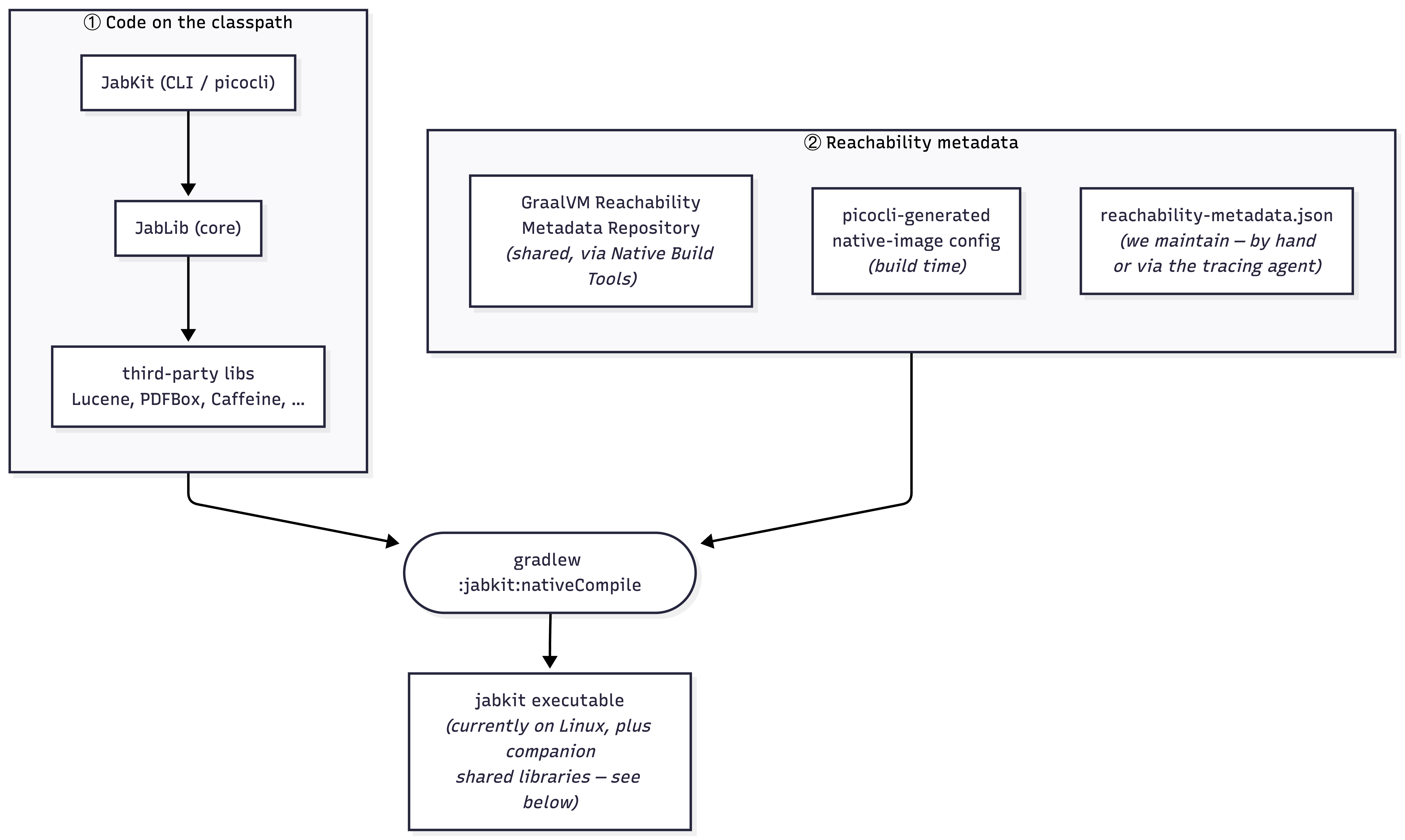
The metadata comes from three places:
| Source | Who maintains it | What it covers |
|---|---|---|
| GraalVM Reachability Metadata Repository | Upstream/community | Common third-party libraries |
| picocli-generated native-image config | picocli annotation processor | JabKit’s command model |
reachability-metadata.json | JabRef | Gaps not covered by the first two sources; one file per module |
The build uses Liberica NIK Full.
Where the metadata lives
GraalVM auto-discovers metadata on the classpath under a per-artifact path: META-INF/native-image/<group>/<artifact>/. Each module ships its own file:
jabkit/src/main/resources/META-INF/native-image/org.jabref/jabkit/
    reachability-metadata.json      <- JabKit's own (CLI / picocli-facing)

jablib/src/main/resources/META-INF/native-image/org.jabref/jablib/
    reachability-metadata.json      <- JabLib's own (core library)
Both use GraalVM’s unified reachability-metadata.json schema, one file with reflection, resources, and bundles sections (JNI is expressed as a jniAccessible flag on reflection entries).
Metadata for a class belongs in that class’s module. A reflection entry for a JabLib type goes in JabLib’s file, even when only a JabKit command triggers it. This keeps JabLib self-describing for any future native consumer, such as JabSrv or JabLS.
Native smoke test files
| File | Scope | Runs |
|---|---|---|
jabkit-offline.md | Commands needing no network | Linux and macOS |
jabkit-offline-pdf.md | The PDF/AWT path | Linux only; see Liberica NIK |
jabkit-online.md | Commands hitting external APIs | Opt-in with the run-jabkit-online-tests workflow input |
All three files live in jabkit/src/test/nativeimage/ and are invoked by .github/workflows/binaries.yml.
How to build and extend it
Building the binary
./gradlew :jabkit:nativeCompile
The executable is written to jabkit/build/native/nativeCompile/jabkit.
Adding metadata for a new command
This section is about adding a command. For adding or upgrading a dependency, see Dependency management instead.
picocli already generates metadata for @Command and @Option fields, so start with the command’s runtime path instead of duplicating picocli-generated entries.
Collect metadata by running the command under the tracing agent. Use a real invocation with real arguments so the agent records the command’s actual data path. Native Build Tools wires the agent into Gradle:
./gradlew :jabkit:run -Pagent --args="check consistency path/to/library.bib"
The agent over-collects, so its output is a starting point. Then work through this loop:
- Copy the relevant generated entries into the owning module’s
reachability-metadata.json; see Where the metadata lives. - Trim entries that do not belong to the command’s runtime path.
- Build the binary:
./gradlew :jabkit:nativeCompile. - Run the same command path with the native binary. If it still fails, use GraalVM’s runtime error troubleshooting guide or rerun the agent on the missing path, then add the next minimal entry.
- Add a clitest case; see Adding a smoke test.
To find out why the agent collected a particular entry, build the installed distribution and rerun with origin tracking:
./gradlew :jabkit:installDist
JAVA_TOOL_OPTIONS="-agentlib:native-image-agent=config-output-dir=<dir>,experimental-configuration-with-origins" \
  ./jabkit/build/install/jabkit/bin/jabkit check consistency path/to/library.bib
Adding a smoke test
A native binary can build and still crash on a code path with missing metadata, so every ported command gets a clitest case. These tests make metadata cleanup safe: after trimming entries, rerun them to catch broken commands.
clitest reads a Markdown file where $ lines are run and the lines beneath them are the expected output. Use the files in jabkit/src/test/nativeimage/ as examples.
Run a file with:
cd jabkit
clitest src/test/nativeimage/jabkit-offline.md
How to write assertions
- Pass
--porcelainwhere supported to keep command output script-friendly. - Assert exit codes, generated files, or stable machine-readable output.
Known limitations
Liberica NIK
BellSoft Liberica NIK is a GraalVM downstream that ships AWT support. JabKit uses the Full package because PDFBox reaches java.desktop/AWT from its PDDocument static initializer, while stock GraalVM/Mandrel toolchains do not support AWT in native images (oracle/graal#4921).
What the build produces on Linux
The build is not a single self-contained file: on Linux the jabkit executable ships alongside companion .so libraries in jabkit/build/native/nativeCompile/.